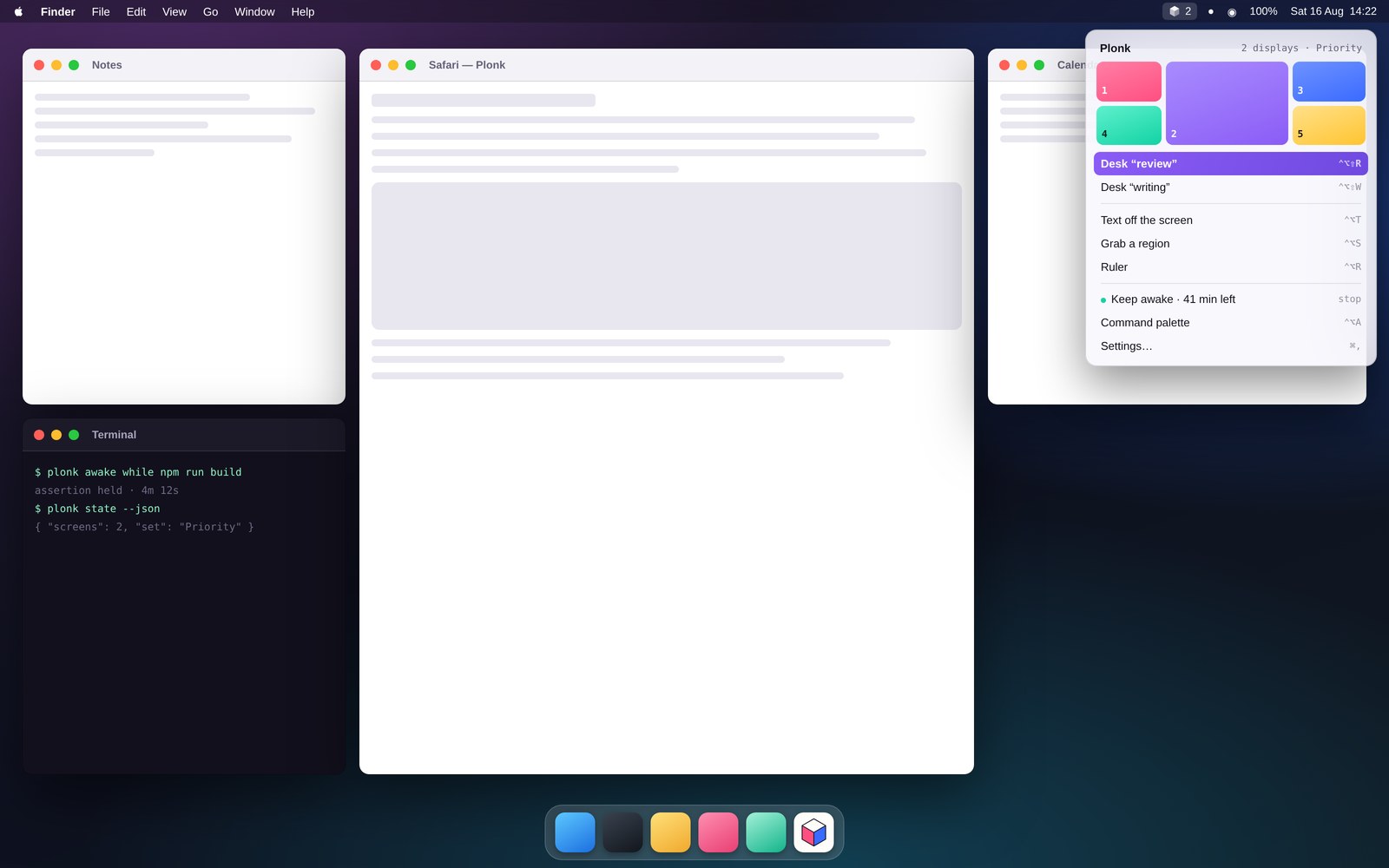
Place windows your way, then bring the whole desk back on the right monitors.
One icon / many ways
A toolbox for your Mac.
Windows, workspaces, screenshots, OCR, measuring, keep-awake, pointer tools, shortcuts, voice and agents. Native, local and modular.
Get Plonk
See the tools
macOS 13 or newer, Apple silicon · free and MIT · no account, no cloud, no telemetry
Eight tools / one system
Keep the parts you use.
Switch off the rest.
Every module shares the menu bar, command palette, shortcuts and local automation surface. Nothing needs a second account, daemon or icon.
arrangeZones and workspaces
captureScreenshots and live crops
Capture, annotate, or pin a changing part of the screen above everything else.
readOn-device OCR
Copy words from images, videos and interfaces without uploading a pixel.
measureA screen ruler
Read clearances and distances in both points and physical pixels.
stayPulse
Keep the Mac awake by timer, schedule, app, charging state or process lifetime.
pointPointer tools
Find the cursor, add crosshairs, show clicks and jump between displays.
recallShortcut guide
Read the front app's real menus instead of relying on a stale cheat sheet.
askVoice, CLI and agents
Use the same app through speech, commands or twenty-two MCP tools.
Capture and understand
The screen becomes useful input.
Keep a visual, pull text out of it, measure it, or pin the part that keeps changing. The pixels stay on your Mac.
⌃⌥SCapture and mark up
Take a region, window or full screen at native resolution, then add a pen stroke, arrow, shape or highlight before saving.
⌃⌥TCopy text from anywhere
Select words in a paused video, image, dialog or locked PDF. Vision runs on-device and places the result on the clipboard.
⌃⌥RMeasure the interface
Hover for clearances or drag for a straight-line distance. Plonk reports both macOS points and physical pixels.
⌃⌥PPin a live crop
Keep a build log, chart or call visible above the rest of the desk. The crop streams live and is never written to disk.
Stay in the flow
Small tools that disappear
until they are needed.
Keep the Mac awake for the right amount of time, find the pointer, reveal an app's shortcuts, or run any Plonk action by name.
Pulse ends by itself
Hold sleep off for a timer, until a wall-clock time, while an app is open, while charging, or exactly as long as a process runs.
Make the pointer visible
Find a lost cursor, add crosshairs, show click rings in a recording, or jump it to the next display.
Ask the app instead of hunting
⌃⌥A runs every tool and settings page by name. The shortcut guide reads the front app's actual menus, so its answers do not go stale.
Arrange and return
A desk that fits the work.
Windows are one module in the toolbox: draw the places you need, save the whole workspace, and bring it back on the correct displays.
Zones are yours. Any count, size or overlap, with a different set per monitor. Place a window by drag, shortcut or voice; swap layouts without losing which numbered place it belongs to.
Workspaces remember context. Save apps, frames, displays and the files, folders or URLs each app should open. Display UUIDs keep the desk stable when a monitor is unplugged.
Everything about zones · How workspaces return · All shortcuts
For agents
The same toolbox,
without the clicking.
Twenty-two MCP tools cover capture, OCR, measuring, keep-awake, layouts, workspaces and zones. This is the app's own surface, not generic automation bolted on beside it.
keep the Mac awake until this build finishes
awake · until npm run build exits
read the error out of that dialog and tell me what it says
EADDRINUSE 127.0.0.1:7654
measure that toolbar, then capture the warning
✓ 52 pt / 104 px · capture saved
put the browser on the left and save this desk as “review”
✓ placed and saved · 2 monitors
# Claude Code
claude mcp add plonk -- npx -y plonk-mcp

# Codex CLI
codex mcp add plonk -- npx -y plonk-mcp
Cursor, Zed, Cline and anything else that speaks MCP work the same way, over stdio or HTTP — several at once is fine, and Plonk shows you who is connected.
All twenty-two tools, the multi-agent rules and the CLI · one-pagers for Cursor, Zed and Cline. For Claude Desktop there is nothing to type: open the .mcpb bundle from the latest release.
22MCP tools for your agent
8utilities behind one icon
0dependencies in the app
0bytes sent to a cloud
Privacy
It isn't watching you.
No account, no cloud, no telemetry. Plonk does its work on your Mac and keeps the result there.
Moving another app's windows costs an Accessibility grant, and a screenshot costs Screen Recording. That is a lot to hand something you installed a minute ago — so none of this is a promise. It is all checkable from a terminal.
# every socket the app has open
lsof -nP -i -a -p "$(pgrep -f Plonk)"
plonk … TCP 127.0.0.1:43917 (LISTEN)
One listener, on loopback. The only outbound call is the update check, which sends no identifier and can be switched off.
# a web page cannot drive it
curl -so /dev/null -w '%{http_code}\n' \
  -H 'Origin: https://example.com' \
  http://127.0.0.1:43917/state
403
# nor can another program on your Mac
curl -so /dev/null -w '%{http_code}\n' \
  http://127.0.0.1:43917/state
401
The API is gated on a token only you can read, so a script cannot borrow Plonk's Screen Recording by asking the port.
Releases are built and signed on GitHub's runners and ship with an attestation, so the binary on your Mac ties back to the commit it came from:
gh attestation verify Plonk-<version>.zip -R ostapondo/plonk
Check it yourself is every claim above with the command that tests it. SECURITY.md says where each promise stops.
Install
One line, and it's yours.
$
brew install --cask ostapondo/plonk/plonk
- macOS 13 or newer, Apple silicon
- Say yes to Accessibility when it asks, then relaunch
- No Full Disk Access, no Automation, no Keychain
- Gets along fine with Rectangle, Magnet and Raycast
- Coming from Rectangle: one button takes your shortcuts, and your
rectangle://scripts keep working
Download the .zip
Source on GitHub
Signed, built and attested on GitHub's runners — check the binary against the commit before you open it.
Plonk is signed but not notarized, so macOS holds a copy you download by hand; the cask clears that for you. And it is early — version 0.4.x, one author. Shortcuts, zone files and workspaces are settled; the MCP tool names and the HTTP API can still change between minor versions.
Or help build it. It compiles and tests on a plain checkout with no signing certificate and no account: CONTRIBUTING.md is five commands long, and the good first issues each say where the code is and how to tell it worked. The smallest useful change is one JSON file in zone-sets/.