# Zones
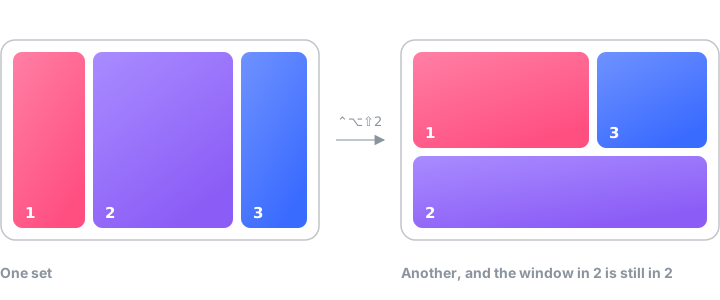

Five sets ship with it. Everything past that you draw yourself: any number of
zones, any size, overlapping if you want — a narrow rail for chat, a wide middle
split in two, a strip for the terminal. Or describe it and let the agent build
it.
| | |
| --- | --- |
| **Editor** | Click to cut a zone into top and bottom, right-click or `⇧`-click into left and right, `✕` to delete and let the neighbours heal over the gap |
| **Dividers** | Drag one to resize both sides at once. It is pulled onto halves, thirds, quarters and the edges of neighbouring zones from within twelve points, and left exactly where you drop it otherwise |
| **Per monitor** | Each screen gets its own set, remembered by display, not by index |
| **Overlap** | Allowed — the smallest zone under the cursor wins |
| **Trigger** | On drag, or only with a modifier held. Holding it inverts the mode, so a free move stays one keypress away. Or shake: wiggle the window sideways while dragging and the zones come up without the modifier, if that switch is on |
| **By click** | Hold `⌃⌥Z` and the zones stay up on every screen. Click one, or press its digit while holding, and the front window goes there. Let go and they linger a moment, still clickable |
| **Span** | Hold `⌘` as well: the zone you started over and the one under the cursor become a single drop, so two columns make one wide window without editing the set |
| **By number** | `⌃⌥1`–`⌃⌥9` drop the front window into the zone the overlay draws that number on. `⌃⌥0` gives it back the frame it had before Plonk first moved it |
| **Or none** | Edge snapping instead: middles are halves, top is maximize, corners are quarters |
| **Or hover the line** | Bring the cursor near the border between two zones and both light up, no modifier at all |
| **Whole sets** | `⌃⌥⇧1`–`⌃⌥⇧9` swap the set on the screen the cursor is on. Windows already sitting in a numbered zone move to where that number is now |
| **Picking one** | `⌃⌥L` draws the sets for that screen as a list: arrows or the digit to pick, `return` to use it, `E` to open it in the editor, `N` for a new one |
| **Looks** | Gap, colour, opacity, numbers on or off, every monitor's zones shown while dragging. The gap is real — a window keeps that much space around it. That gap is the default; a layout can set its own in the editor's Gap row, or follow the default again |
| **Displays** | Unplug a monitor and plug it back in and the windows go back where they sat, not only the ones Plonk placed: the desk on screen is noted as windows move, per set of monitors, and put back when that set returns. A window Plonk placed that the note has no line for returns to its zone |
| **Names** | A zone can be called something — chat, editor, log — in the editor. The overlay draws it under the number, "put this in chat" works out loud, and an agent can hand `snap_window` the name instead of the number |
| **Exceptions** | A list of apps Plonk keeps its hands off — games, remote desktops, anything that manages its own geometry. Asking an agent to place one still works; that names the window on purpose |
| **New windows** | Optionally, a window that opens goes where that app's last one went, or into the first zone nobody is in |
| **Rules** | An app can be told where its windows open: a zone, and if it matters a monitor. Written down, so it outlives a relaunch where the habit does not, and it wins when both apply. `set_app_rule` is the same thing said to an agent |
---
[Workspaces](workspaces.md) · [Hotkeys](hotkeys.md) · [Everything else](features.md) ·
[Coming from Rectangle](from-rectangle.md) · [README](../README.md)