# For agents
Plonk exposes the same native toolbox over MCP, so an agent can read and arrange
the desk, save the result, keep the Mac awake, capture or measure the screen and
read its words — without a screenshot round trip for anything that is really
just text.
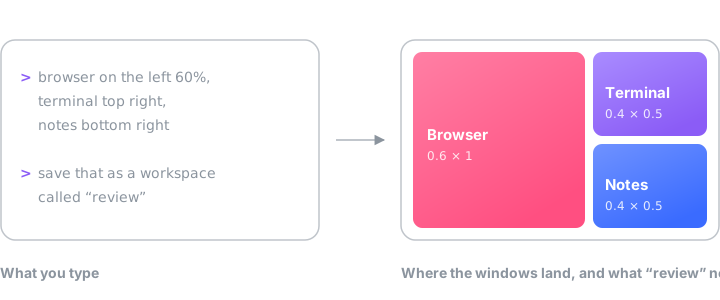
Frames are fractions of a monitor's visible area, origin top-left — which is why
"left 60%" is just `{x: 0, y: 0, w: 0.6, h: 1}`.
## The tools
| Tool | |
| --- | --- |
| `get_state` | Monitors, every open window and where it sits, zone sets, saved workspaces, awake status |
| `apply_layout` | Place any set of windows, across any number of monitors, in one call |
| `save_workspace` · `launch_workspace` · `delete_workspace` | Named desktops, launched from nothing |
| `snap_window` | Drop a window into a zone, by its number or by the name the set gives it |
| `save_zone_set` · `assign_zone_set` · `delete_zone_set` | Snap zones, per monitor |
| `set_app_rule` · `clear_app_rule` | Where an app's new windows open: a zone, and if it matters a monitor |
| `set_awake` | Keep the Mac awake — for N minutes, until a time, or until a process exits — and with `available`, reset the idle timer too so chat apps do not show Away |
| `take_screenshot` · `annotate_screenshot` | Capture, mark up, hand the image back — `mode: "app"` photographs one named window even when it is buried, without raising it |
| `extract_text` | Read the words off the screen and hand back text, with a box for every line in the same coordinates `annotate_screenshot` draws in |
| `measure_screen` | How far a point can go each way before it meets an edge, or the distance between two points, in points and pixels — no image, no eyeballing |
| `select_agent` | Make an agent the user's active one, optionally the only one allowed to control |
| `check_for_update` · `install_update` | Ask GitHub for a newer release, and install it only if it is signed with the same certificate as the running copy |
`save_layout`, `apply_saved_layout` and `delete_layout` are three more, older
names for the workspace tools, kept so clients written against them keep
working. They are fully described in the server; new integrations should call
`save_workspace`, `launch_workspace` and `delete_workspace`, which take the
options the old names never grew.
## Several agents at once
Every client registers itself, so `get_state` lists who is online; the user
picks an active agent from the menu bar or the settings — or an agent does it
with `select_agent`. An optional strict mode locks changes to the active agent:
everyone else keeps reading state and taking screenshots, but gets a clear 409
on anything that moves windows or edits config. Set `PLONK_AGENT_NAME` in a
client's MCP config to tell two sessions of the same client apart.
## Connecting
```sh
claude mcp add plonk -- npx -y plonk-mcp # Claude Code
codex mcp add plonk -- npx -y plonk-mcp # Codex CLI
```
Any MCP client works the same way — give it `npx -y plonk-mcp` as a stdio
server. One-pagers: [Cursor](clients/cursor.md) (with a one-click install
button), [Zed](clients/zed.md), [Cline](clients/cline.md).
A client that cannot spawn a process connects over HTTP instead:
`npx -y plonk-mcp --http` serves Streamable HTTP at
`http://127.0.0.1:43918/mcp` (loopback only, many clients per process,
`--port` to change). That port asks for the same token the app does, so give
the client an `X-Plonk-Token` header holding the contents of
`~/Library/Application Support/Plonk/token` — otherwise the transport would be
a way around the gate rather than through it.
## From a shell
The same package carries a `plonk` command, for the things that are neither an
agent nor a settings window — a Makefile, a Raycast script, a shell alias.
`npm i -g plonk-mcp`, then:
```sh
plonk ping # is the app up
plonk state [--json] # screens, windows, zone sets, workspaces
plonk snap # drop a window into a zone, by number or by name
plonk workspaces # list the saved ones
plonk launch [--screen N] # launch one, optionally onto one monitor
plonk save # save the desktop as one
plonk zones [--screen N] # assign a zone set to a monitor
plonk awake on [--minutes N] [--until HH:MM] [--pid N]
plonk awake off
plonk awake while npm run build # awake for exactly as long as the build
plonk measure [X Y] [--screen N] [--tolerance N]
plonk text [--mode region|window|screen] [--path FILE]
plonk shot [--mode region|window|screen] [--path FILE]
```
`plonk text | pbcopy` puts a region's words in the clipboard;
`plonk state --json | jq` is the machine-readable half. Everything talks to
`127.0.0.1:43917`, so Plonk.app has to be running.
---
[README](../README.md) · [Check it yourself](verify.md)